
The right LMS enables you to deliver consistent training, track employee progress, ensure compliance, and develop the skills your workforce needs to succeed. But with hundreds of platforms available, each promising to transform your learning programmes, how do you choose the one that fits your organisation’s needs?
The reality is that most organisations aren’t getting it right. Only 9% are completely satisfied with their LMS, according to Brandon Hall Group. Half are struggling with integration issues, over half are missing key functionality, and just 24% view their LMS provider as a true business partner. It’s evident that many are making do with systems that don’t fully work for them.
In this guide, we’ll walk you through how to select an LMS that supports your organisation’s goals. You’ll learn which questions to ask upfront, how to assess long-term value and scalability, how to define your must-have requirements, and how to evaluate vendors with confidence.
Key questions for LMS selection
When you’re selecting a new LMS, it’s tempting to dive in and start comparing lists of features for different systems. But, instead of that, think about what your learning platform is really for.
Start the LMS selection process strong by identifying what you need based on your corporate objectives, training goals and budget. Ensure you have your goals clear in your mind before you even start comparing solutions.
1. What are your business-related training goals and objectives?
Whatever your goal, ensure you keep this front of mind throughout your learning platform selection process. Business and training goals vary between different organisations, but here are some examples that we’ve seen companies use when selecting a new LMS:
- Reduce the cost of training by 30%.
- Increase compliance rates to 100%.
- Support growth by onboarding new employees and extended enterprise employees, like contractors.
- Reduce employee attrition rates.
- Help resellers improve their sales figures.
- Improve compliance rates.
- Support better customer service skills.
2. Who are your end users?
Let’s go over some examples to best understand this:
With a global reach spanning 20 countries, Glovo, an app-mediated courier service, has over 3,400 customer service agents spread across 15 different call centres.
Demand for their services soared in 2020, and with an extended enterprise workforce of independent contractors acting as the backbone of stakeholder support, Glovo chose Totara Learn as the LMS to support thousands of external agents who received up-to-date training relevant to an agent’s country, region or specific support role.
Deloitte, on the other hand, used Totara Learn to help create a story-driven training experience that helps in-house accountants adapt to digitalisation.
In both case studies the end users, objectives and outcomes are distinctly different and show why acknowledging your primary demographic of end users is an ideal starting point; features and requirements are viewed under an objective-driven lens that moulds selection requirements to your unique and specific needs.
Establishing who wants what involves some legwork upfront, but the benefit of starting with this understanding of your needs is that you can ensure you’re making the right choice not just for the L&D team, but for your stakeholders, your learners and the organisation as a whole. And often, this won’t just be one conversation – you should involve your learners and stakeholders throughout the selection process to ensure that you’re making an informed decision.
After you’ve identified these core users, move on to grasping the needs of other users such as your company’s:
Managers: They’ll need to track progress, monitor completion rates or keep senior stakeholders in the loop with LMS reports and analytics. Ensure that you know how they will interact with the LMS so that it supports their everyday workflow.
IT/Support department: Are they able to meet the technical specifications and requirements of your potential LMS? Does it meet their standards of security? Will your IT infrastructure support it? These are important questions to ask.
Learning designers: Whether your learning design expertise is in-house or provided by external vendors, ensure that you know what they need from an LMS in terms of features, content creation and flexibility.
3. What budget and resources do you have at hand?
Your available budget is an important factor when choosing an LMS platform. The LMS pricing models you encounter will vary from vendor to vendor, so it’s hard to make cut-and-dry comparisons when reviewing this important question.
After considering pricing, you should also review what you can support in terms of implementation, support, hosting and customisation.
A smaller budget and company size might mean that opting for a cloud-based LMS platform is ideal for your organisation. A large budget and complex customisation requirements might necessitate an on-premise or partner-supported learning platform.
4. Do you need a cloud LMS or a hosted/installed LMS?
A cloud LMS is hosted on your supplier’s server as part of the package. An installed LMS, however, is run on your organisation’s servers.
As covered in our Totara vs Moodle vs Workplace post, cloud-based proprietary platforms are sometimes ideal for budget-conscious organisations but offer little in the way of adaptability, support and customisation when compared to hosted/installed learning platforms.
5. Is your organisation aiming for adaptability?
It might be that you currently only use face-to-face training, which doesn’t allow you to respond to demands as quickly as desired. In this case, you’d need an adaptable LMS that integrates with authoring tools and workplace software like Microsoft Teams to allow you to create and distribute up-to-date training.
Or perhaps you simply need something that is flexible and allows you to add new training when required. This could even involve combining online training such as e-learning with offline methods, such as classroom sessions or group work, in a flexible blended learning programme.
Either way, considering both immediate and future corporate training requirements will help you select an LMS that serves and adapts to your long-term needs.
6. How tech-savvy are your employees?
Do you have an organisation full of tech-loving millennials and gen Zs or are you a local government agency full of employees with mixed technical capabilities?
You need to consider whether your prospective LMS is intuitive and user-friendly enough for your employees. This will ensure everyone has an equal opportunity to access learning and isn’t put off by the difficulty of completing training.
If you have employees globally, you may want a system that can also support translated versions of your e-learning courses.
You’ll also need to consider the basics such as how users will sign on and find the necessary training.
7. How will I measure the impact?
An investment in a new LMS is only worthwhile if you can witness and report on the impact it has on your workforce, which ties back to your business-related training goals.
Will you measure the success of your LMS by judging the percentage increases in compliance rates? A reduction in hazardous incidents? Or by the cost-savings provided by your LMS?
While there are many elements to consider when choosing a new LMS, these seven questions are an important starting point for the second phase of LMS selection.
Choosing an LMS: features vs flexibility
Over the years, we’ve heard from so many organisations that are unhappy with their learning management system. What looked like a great deal all those years (or even months) ago, with all the possible bells and whistles included, now suddenly doesn’t look so appealing. So why do so many organisations get it wrong?
Blinded by features
Let’s start with a scenario.
A retail organisation is looking for a new LMS. LMS A has 100 features, and costs £X a year. LMS B has 200 features, and also costs £X a year. Choosing LMS B seems the obvious choice, right? Well, not necessarily.
More features don’t always make for a ‘better’ LMS. LMS A may have fewer, more advanced features, whereas LMS B might have a lot of features you will never use. Selecting an LMS based on the sheer number of features is a mistake, even if you convince yourself that the features you don’t use now might be useful in the future.
This is a very common pitfall of the LMS procurement process: the feature shoot-out, where features alone are prioritised without considering other important aspects of the systems in the shortlist. Just because platform X has twice the number of features as platform Y, that doesn’t mean it is the right platform for you, or just because platform A is half the price of platform B, that doesn’t mean it will offer better value for money in the long run.
Many organisations make the mistake of immediately entering a feature-by-feature showdown of the learning platforms on the market. However, this is the wrong way to go about selecting a platform that will support your organisation’s needs over time. For instance:
- Will your people actually use all of the functionality?
- Can your IT infrastructure support it?
- Will it integrate with your other systems?
Prioritise flexibility and the value of your LMS
What do we mean when we say ‘flexibility’? For starters, choosing an LMS based on open technology will give you the freedom you need to adapt quickly in today’s fast-changing world.
The more flexible your LMS, the more valuable it is. Prioritising flexibility means that you can customise the out-of-the-box features, or just build your own new features according to what your organisation needs, no matter where you are in your contract. If your organisation goes through a rebrand, you can quickly update the look and feel of your LMS to match. If you need to create a new single sign-on (SSO) solution to integrate with your other systems, you can do this yourself with an open LMS.
When it comes to retaining the freedom to innovate, there are several factors to consider:
Branding: Does your platform need to suit your organisation’s look and feel, or is a unbranded product acceptable?
Device compatibility: Which devices will your learners be using (think about personal devices used outside of work too), and how many of these will your learning platform need to support?
User experience: Do you need to customise by role, remember preferences or offer personalised learning based on previous interactions with your platform?
Cost: What is your overall budget, and how will you ensure that you are only paying for features you will use?
Integration with other systems: How will your learning platform fit into your wider blended programme? Does it need to sync up with your HR system, your CRM, your social learning platform or anything else?
Will this platform grow with our needs?
Can we easily scale user levels as we need to?
If you go on a recruitment drive, open a new office, acquire a new company or open your learning up to a new group, your learning platform needs to be able to handle this. Will scalability come at a cost, or do you have the freedom to upscale (and downscale) as you need to?
Can we extend outside our organisation?
The use case for your learning platform may change, or grow, over time. If you decide to open up your platform to partners, suppliers, resellers, end customers or the general public, will your chosen platform be able to support this? Can you divide your learners into audiences? What about security concerns?
How will adding new features and functionality work?
While a learning platform may appear to tick all of the boxes on the day you sign your contract, don’t forget that things can – and do – change quickly in today’s business environment. If you need a new feature in the future, can you add this yourself, or are you at the mercy of your vendor, who will have their own priorities on their roadmap? This is where flexible, configurable, enterprise open software comes into its own – you have the freedom to create a solution that suits your needs, rather than working around the features that are currently available.
Define your must-have LMS requirements
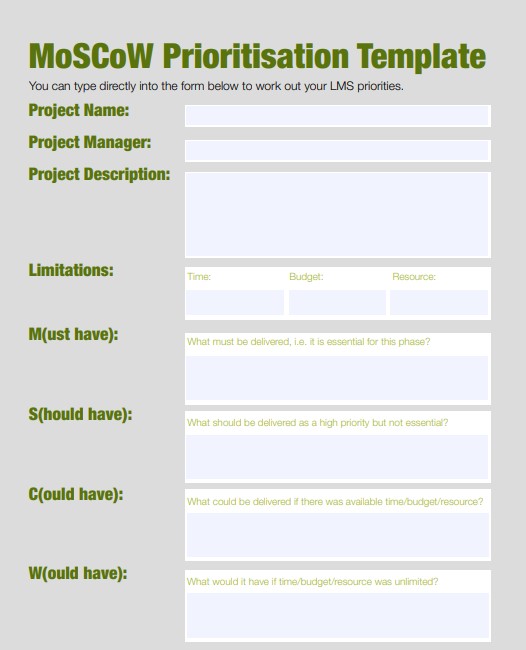
When it comes to analysing LMS requirements and features, consider creating a MoSCoW spreadsheet (Must Have, Should Have, Could Have, Won’t Have) to ensure you’re clear on your priorities.
If you need inspiration, use the MoSCoW template.
FAQs
How can AI improve my LMS experience?
How do I know if an LMS provider is credible?
Should I set objectives before choosing an LMS?
What LMS features should I look for to improve learner engagement?
Author
Fatima Nadeem
Date Published
16/03/2026
Article Type
Blog
Topics
Software Procurement
Solutions
Learn