

From complex compliance management to workforce upskilling, Totara Version 20 (V20) delivers new features and intuitive workflows that streamline administration while elevating the learner experience.
This is one of our largest releases of new features in recent years. This blog provides a brief summary of the main release items, with useful links allowing you to explore our key features in more detail. V20 includes:
- Flexible multi-year recertification pathways
- New compliance insights reporting block
- Learner self-enrolment for programs & certifications
- Enhanced skills functionality and reporting
- AI features that enhance the learner experience and boost L&D efficiency
- Multi-Factor Authentication for all users
- Time-saving administration workflows that support compliance management
- Content discovery and search enhancements
- Plus Mobile App enhancements and new APIs
See all these new features in action – watch our V20 demo webinar recording.
Download the What’s new in Totara V20 PDF.
Efficiently maintain compliance over time with powerful new multi-year recertification pathways
Handling complex certification requirements has had a major upgrade, making it easier to manage multi-year recertification cycles and maintain compliance over time.
A single certification can now manage multiple paths, expiry rules, and reinstatement behaviours. Totara’s certification engine now gives organisations total control over how mandatory training is structured, delivered, and maintained.
Learn more about Totara’s flexible multi-year recertification pathways in our in-depth blog post.
See Help Docs for more information on certifications and recertification cycles.
New compliance certification reporting block
Get an instant snapshot of certification compliance status without manually creating reports each time. The block format provides easy access to drill down insights that provide a quick, visual overview of certification compliance across teams.
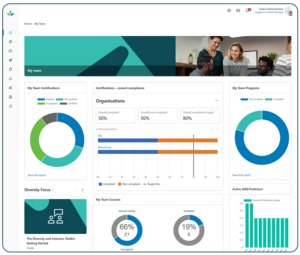
This block provides managers with clear, actionable insights that they can add to their ‘My Team’ dashboard without the need to create custom reports each time.
Learn more about the certification reporting block in our blog post.
See Help Docs for more details.
Learner self-enrolment for programs & certifications
Learners can now enrol to (and withdraw from) programs and certifications. Learners have the freedom to browse programs and certifications from the catalogue and enrol themselves, without needing to request access first (as they did in prior versions).
This encourages self-directed learning, even in the most compliance-focused environments. Note that admins must enable this functionality – this ensures learners can only self-enrol onto (or withdraw from) appropriate programs and certifications.
When enabled, this can save administrators significant amounts of time as they will no longer need to manually assign individuals.
See Help Docs for more details.
Upskill your workforce with new skills reporting and functionality
You may notice something a little different in Totara V20 – we’re shifting our terminology from competency to skills. We’re changing this to reflect the language used by customers, partners, business stakeholders and the broader L&D community.
V20 introduces a number of exciting features that make it easier to nurture skill development with targeted training and reporting:
Team Skill Proficiency block
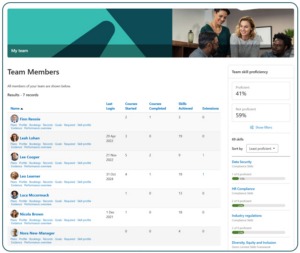
The Team Skill Proficiency block provides line managers and secondary line managers with a clear view of their team’s current skill levels. It allows managers to identify gaps, recognise strengths, and efficiently rate their team’s skills where needed.
This block provides managers with clear, actionable insights that they can add to their ‘My Team’ dashboard without the need to create custom reports each time.
See Help Docs for more details.
Clearer skill gaps reporting
Clearer visuals and reporting options provide snapshot views of proficient vs not proficient status.
See Help Docs for more details.
Skill rating by audience
Perfect for healthcare and highly regulated sectors, this enables flexible on-the-job assessments of skills, where supervisors can observe staff completing tasks and mark them as competent.
Admins can now add audiences to observe and rate competencies – effectively allowing organisations to assign this task to anyone they choose by assigning them to an audience.
See Help Docs for more details.
New audience type – ‘skill proficiency’
Group learners by skill proficiency with this new audience type. This enables smarter enrolments and targeted next-step learning, as well as increased reporting options.
See Help Docs on audience rules and add an audience rule set.
AI features that improve the learner experience and boost L&D efficiency
We’re excited to introduce four new AI-powered plugins that streamline content creation – all within your LMS. Refine your text so it’s concise, relevant and engaging, and create the perfect images that exactly match your course and resource topics.
Launched in Totara V19.1, these are now available to all users in V20. Getting a helping hand from AI with these time-saving features:
- AI Writing assistant – refine, summarise and create consistent course and resource text
- AI Image generation- create images in the flow of work
- AI Knowledge check-in – create informal quizzes from resources
- AI SMART goal assistant – create structured, focus SMART goals to aid your personal development.
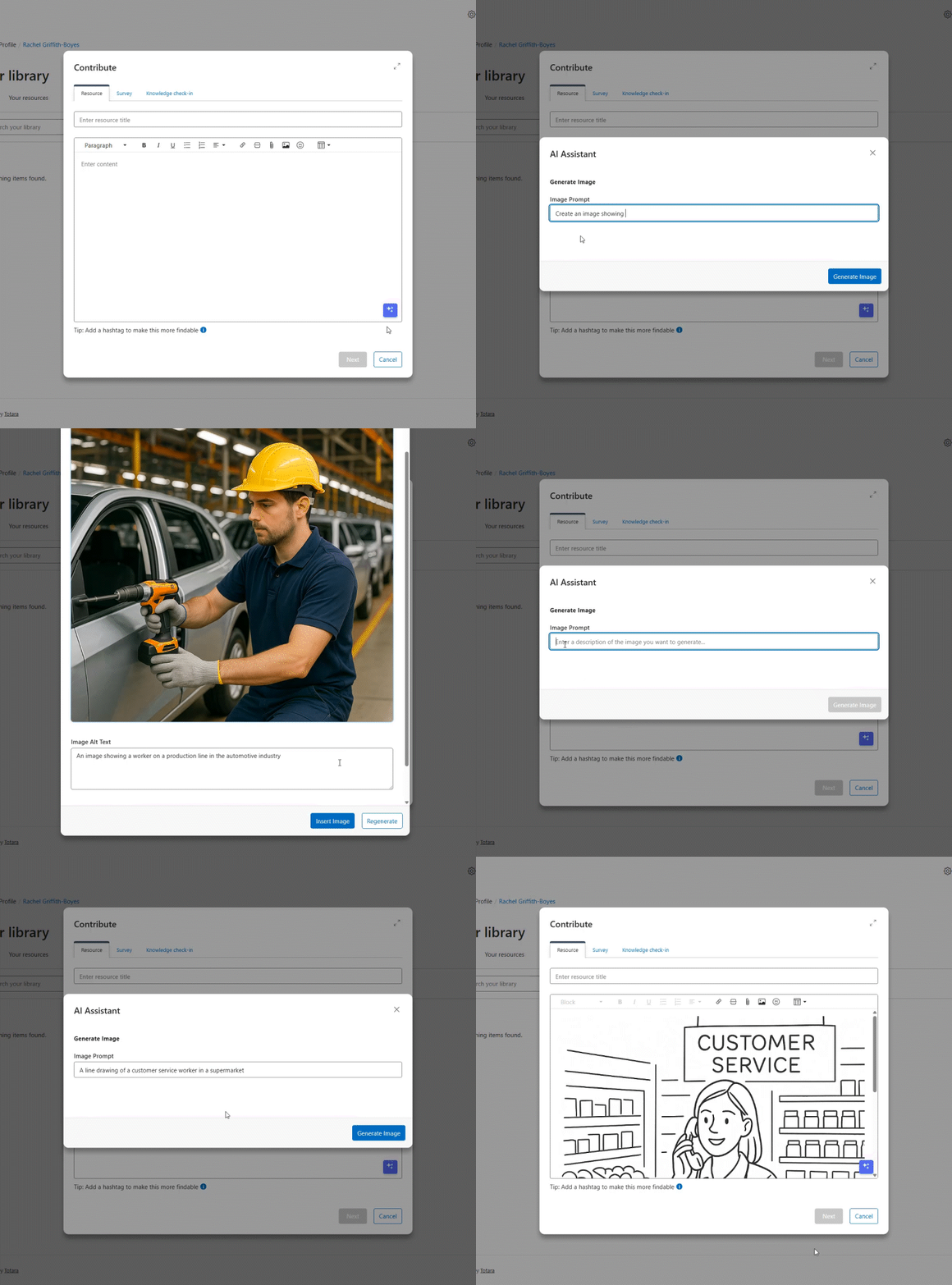
These tools have massive potential to boost both the admin and learner experience of Totara.
Learn more about each of Totara’s AI features.
Check out our blog on how to get the most out of Totara’s new AI-powered features, including tips on writing effective prompts.
Enhanced security with new Multi-Factor Authentication rules
Tighten your security protocols with our Multi-Factor Authentication rules. Define specific rules that when matched, require users to set up multi-factor authentication. This ensures stronger account security and can be applied to specific user groups.
See Help Docs for more details.
Time-saving admin workflows for strong compliance management
Creating robust learning programs that support mission-critical learning in complex organisations is essential for Totara’s users.
We’ve listened to your feedback, and made a number of small but powerful enhancements that reduce admin complexity and cut out workarounds – so you can focus your time on delivering an outstanding learner experience:
Preview audience changes & improved audience rules layout
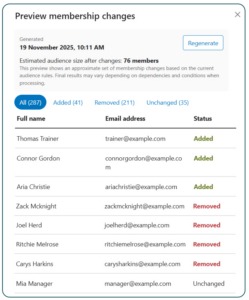 Making changes to audiences with large numbers of users can have a big impact, for example triggering notifications. New preview panels reduce the risk of errors.
Admins now have a preview panel that offers a clear overview of total users added and removed, as well as a clear display of individual users and their status.
We’ve also refreshed the layout and usability for audience rules, with clearer navigation and naming conventions. This reduces complexity, making it easier to onboard new admins, efficiently complete the Rules workflow and visually easier to read the information on the page.
See Help Docs for more details.
User Status is visible on User Profile
A user’s status (active or suspended) now clearly shows next to their profile. This improvement prevents admins from searching the system and running separate user status reports to find this commonly used information.
See Help Docs for more details.
Export reports in background
Exporting large scale reports (for example, with tens of thousands of data-points) used to require admins to wait while the data processed in the current tab. V20 enables reports to export as a background task, freeing admins to continue work elsewhere in the LMS while the report export processes.
See Help Docs for more details.
Mandatory Date/Time field improvements
This small change will make a big difference to data integrity. Mandatory Date/Time fields are now empty by default, prompting users to select a value before submission.
Previously this field would pre-populate with a default value, which users may not always amend to the correct date. Now this field is blank by default, users will receive a warning to prompt them to fill in the field. This improves data accuracy and integrity.
Content discovery and search enhancements
Helping your learners quickly discover relevant learning resources is essential for creating an engaging learning experience.
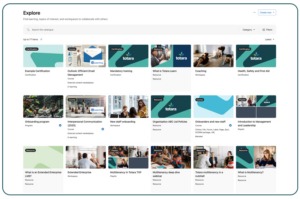
In Totara V20 we’ve improved content search, how content works in catalogues and improved dashboard functionality:
- Smarter partial word matching
- Enhanced wildcard search for more flexible matching
- Smarter search with spell check suggestions
- Enhanced recommended content engine in Explore catalogue
- Exclude courses from catalogue
- Dashboard – Accessibility improvement and UI tweaks
- Enable admins to order and find dashboards
Head here for more detailed feature descriptions and help doc links.
Digital attendance check-in for seminar events
Move on from roll calls and manual tracking. Learners can now mark their own attendance using a secure link or QR code — whether they attend in person or online.
- Trainers save time – no need to track people down or take roll calls
- Works anywhere – scan a QR code in a room, or click a link in an online session
- Scales beautifully – especially helpful for large group trainings
- Reduces admin errors – check-in records are created directly by the learner
- Supports compliance – check-ins are tied to user login and seminar events
See Help Docs for more details.
New offline synching options for Mobile app
Please note that updates to the Mobile app will be available on 28th January 2026.
We’ve added a setting that allows users to choose their offline sync preference:
- Auto vs Manual sync
- Wi-Fi only or Wi-Fi+Mobile Data
Auto synching offers learners better experience in low-connectivity environments, helping learners pick up right where they left off.
See Help Docs on Mobile offline support.
Remove access to performance activities upon role change
In Totara Perform, we’ve added the ability to manage users’ access to performance activities to maintain compliant privacy and data access policies.
Admins can apply a global setting to remove access when a participant changes roles. This automatically removes manager, manager’s manager, or appraiser access to closed activities when they no longer share a job assignment with the subject of the activity. Admins can also remove participants’ access from closed performance activities.
This ensures only the appropriate people retain access to past activity records when an employee changes role or has a new manager assigned .
See Help Docs for more details.
New APIs to connect your LMS with essential business systems
We’re expanding our API services for seminars, report builder and programs and certifications.
This offers more expansive options for partners to extract data to a BI tool, provides more Seminar functionality, and allows you to get back a list of the certifications and programs that exist in the system, also enabling you to enrol users via their assignment groups.
In addition, we’re expanding Totara’s integration with Workato by adding more supported API actions and triggers, making it easier to connect Totara with other systems.
We’ve also introduced new webhook functionality. Rather than relying on repetitive API polling, webhooks allow Totara to instantly push updates – like course completions – to external systems in real time.
Find more information on these updates, check our Help Docs on:
Author
Ashley Laurence
Date Published
27/01/2026
Article Type
Product
Solutions
Learn, Perform, Totara Suite